Store speed
A weekly page speed test for your store
Store speed runs Google's page speed test on your home page, a product page and a collection page every week. It shows what slows each page, and who can fix it.
Coming soon to the Shopify App Store
See all 13 tools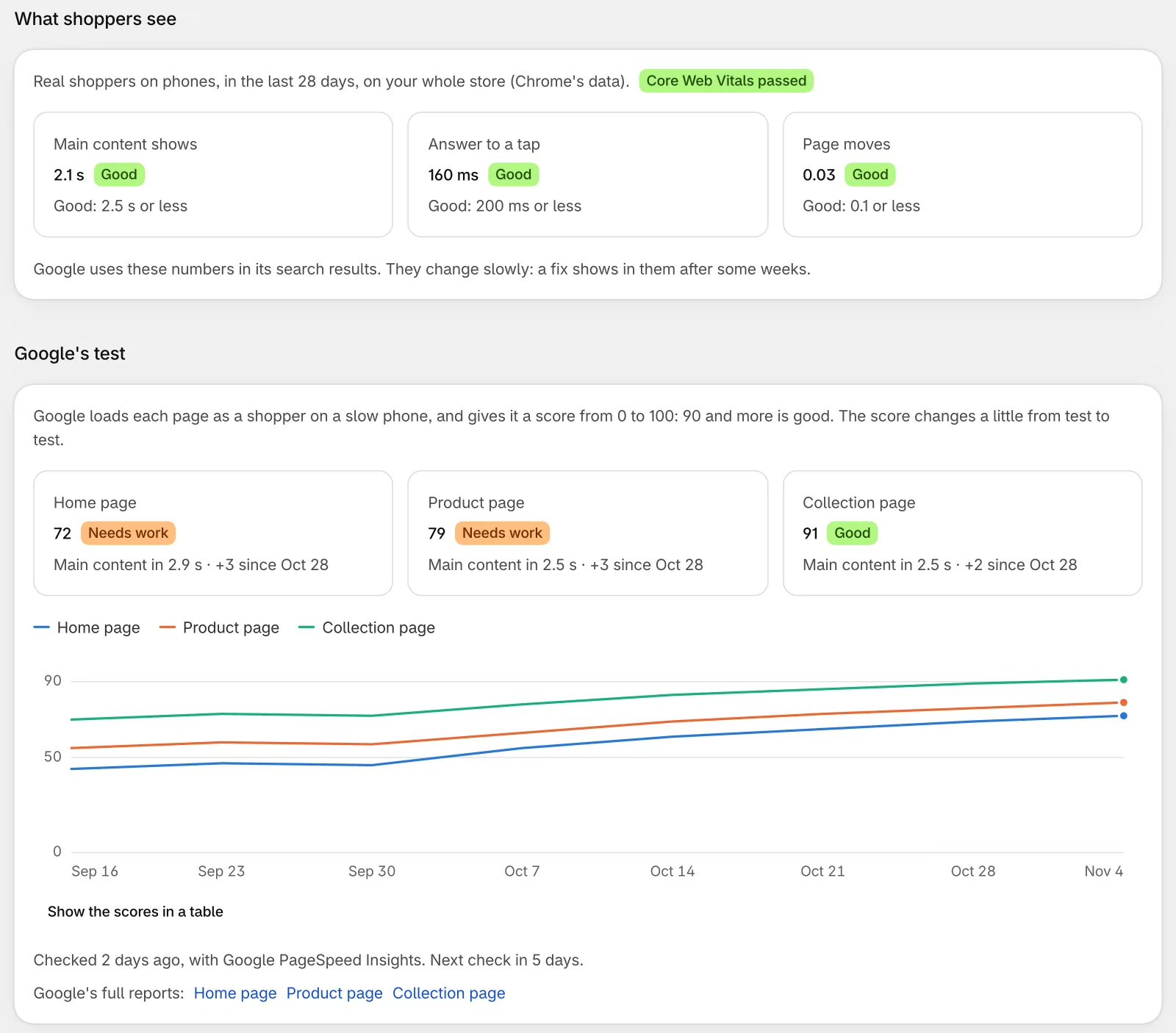
What it does
Google PageSpeed Insights on a phone
Google tests your three pages as a shopper on a mid-range phone with a slow network. You see the score of each page, and what Google takes as its main content.
Who can fix each problem
Each problem is in a group: what Super Useful can fix, what you can fix, what your theme developer can fix, and Shopify's part. In each group, the biggest problems come first.
What loads on your pages
A table shows your theme, Shopify, and each app or service on your pages, with the time and the data that each one adds. For an app that adds a lot, copy a note for its support team.
A new check every week
The speed test runs again every 7 days by itself, and the scores of each check make a trend. New problems get a New label, and a big drop gets a warning.
Core Web Vitals of real shoppers
When Google has enough visits of your store, you also see what real shoppers on phones got in the last 28 days, and whether your store passes Core Web Vitals.
Notes for your developer
Copy notes for your theme developer, with the pages, the files and the fix of each problem. For the problems that you can fix, links open the place in your Shopify admin, such as the theme editor or Customer privacy.
How to start
Turn on Store speed
Install Super Useful, then turn on Store speed on the app's Dashboard.
Open Store speed
The first check starts by itself. Google tests your pages in about a minute, and the report shows on the page.
Start with the top problems
Fix the problems at the top of each group first, or send the notes to your developer. Then click Check now to test again.
Questions
Can it test a store with a password?
No, because Google would see only the password page. Remove the password in Online Store, Preferences, and the check starts when you come back to the page. A development store always has a password, so Google cannot test it.
Why does my PageSpeed score change from test to test?
Google loads your page again for each test, on its own servers, so the score moves a little each time. Compare the trend over some weeks. The list of problems changes less than the score.
Does Store speed change my theme?
No. It never changes your theme, and it never hides a problem to get a better score. Image files are the one thing that it can fix: one button sends them to Image optimizer.
Can I choose which product page it tests?
Yes. In Settings, choose a product and a collection. If you do not, the app tests a product with images, the same one each week, and the page of all your products.
More answers in the questions and answers.
Also in Super Useful
One app and one subscription. Turn on only the tools that you need.
Store speed, and 12 more tools
All in one app for your Shopify store.
Coming soon to the Shopify App Store