Upsells
Cart upsell and cross-sell offers
Add a cart upsell to your theme's cart drawer and cart page: products that go with the cart, each with an Add button. On Shopify Plus, the offers can show at checkout too.
Coming soon to the Shopify App Store
See all 13 tools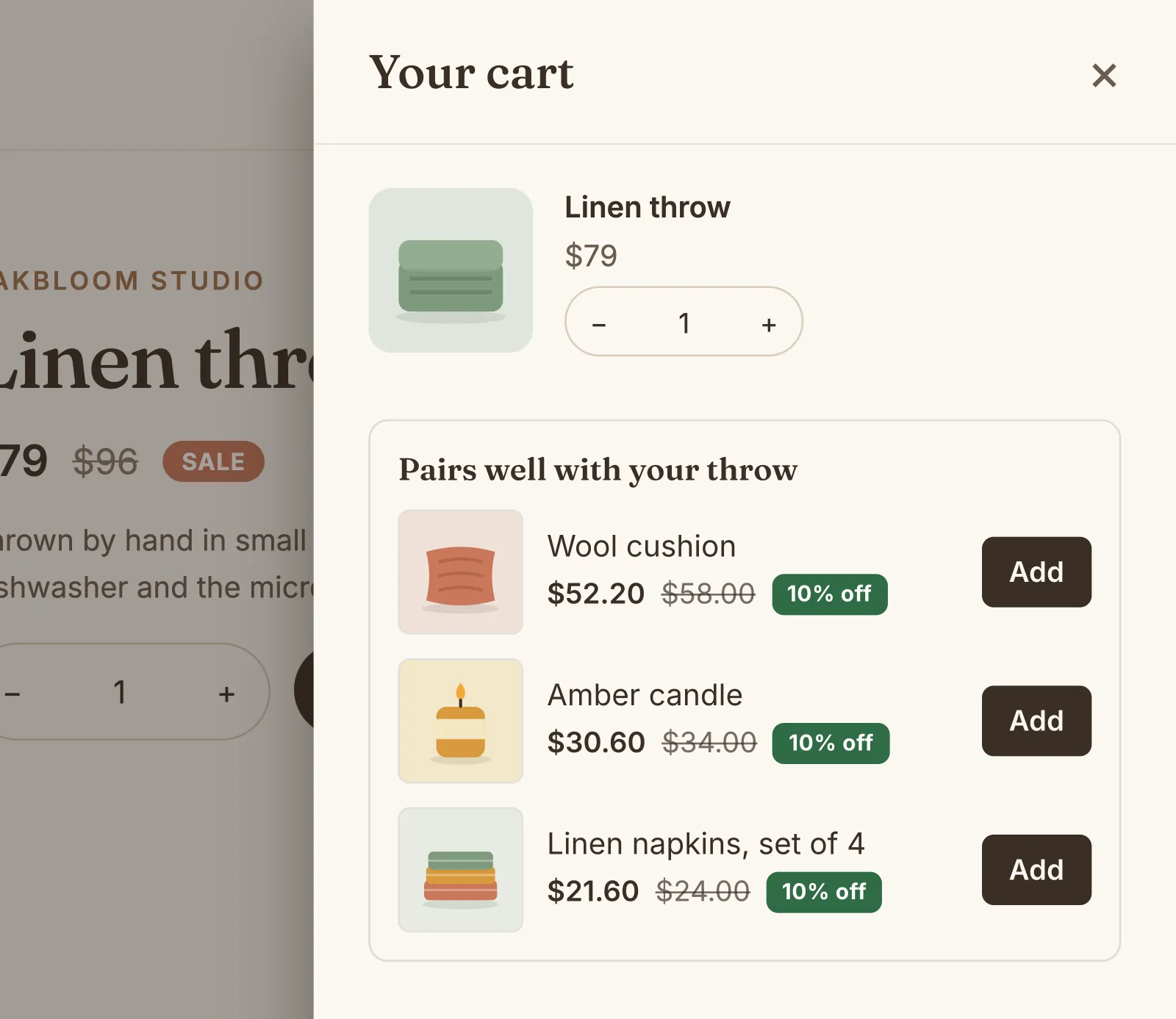
What it does
Offers that match the cart
Show an upsell in every cart, or only when the cart has one of your trigger products: for example, a case when the cart has a phone. Products that are in the cart already do not show.
Cart drawer and cart page
On most themes, the offers go above the subtotal of the theme's own cart drawer. On the cart page, they go under the checkout button, with no change to your theme.
An optional cross-sell discount
Give a percentage off the offered products while a trigger product is in the cart. Choose how many units of each one get it, for example 1.
Checkout upsell on Shopify Plus
On Shopify Plus, add the Upsells block in the checkout editor. It shows up to 2 products, in the style of your checkout.
A list or a carousel
Show 1 to 4 products in a list, or side by side in a carousel. Each has its picture, its price and an Add button, with a menu of its variants when it has options.
Numbers and order of upsells
The card of each upsell shows its views, adds to cart and sales of the last 30 days. When a cart matches two upsells, the one higher in your list comes first.
How to start
Turn on Upsells
Install Super Useful, then turn on Upsells on the app's Dashboard. Turn on the app embed once, in your theme editor: the Dashboard has a link to it.
Add an upsell
Choose up to 4 products to offer and the carts that get them. Add a discount when the upsell has trigger products.
Shoppers add from the cart
The offers show in the cart drawer and on the cart page. A product leaves the offers once the shopper adds it.
Questions
Can I show upsells at checkout?
Yes, on Shopify Plus. Turn on Checkout in the upsell, then add the Upsells block in the checkout editor. On other plans, the offers show in the cart drawer and on the cart page.
Does it work with my theme's cart drawer?
Yes, on most themes: the app finds the drawer by itself. If your drawer shows no offers, an advanced setting on the Settings page of Upsells tells the app where to put them.
What does a cart show when no upsell matches it?
Nothing, unless you turn on Shopify's product recommendations on the Settings page of Upsells. The cart then shows products that Shopify suggests for its first item, with no discount.
Does the discount apply when the shopper adds the product from its own page?
Yes. The discount applies while a trigger product is in the cart, wherever the shopper added the offered product. When no trigger product is left in the cart, the discount goes away.
More answers in the questions and answers.
Also in Super Useful
One app and one subscription. Turn on only the tools that you need.
Upsells, and 12 more tools
All in one app for your Shopify store.
Coming soon to the Shopify App Store