Loyalty points
Loyalty points that turn into discount codes
Give customers loyalty points for their orders, and let them trade the points for discount codes at your store. You choose what earns points, what each reward costs, and how the rewards panel looks.
Coming soon to the Shopify App Store
See all 13 tools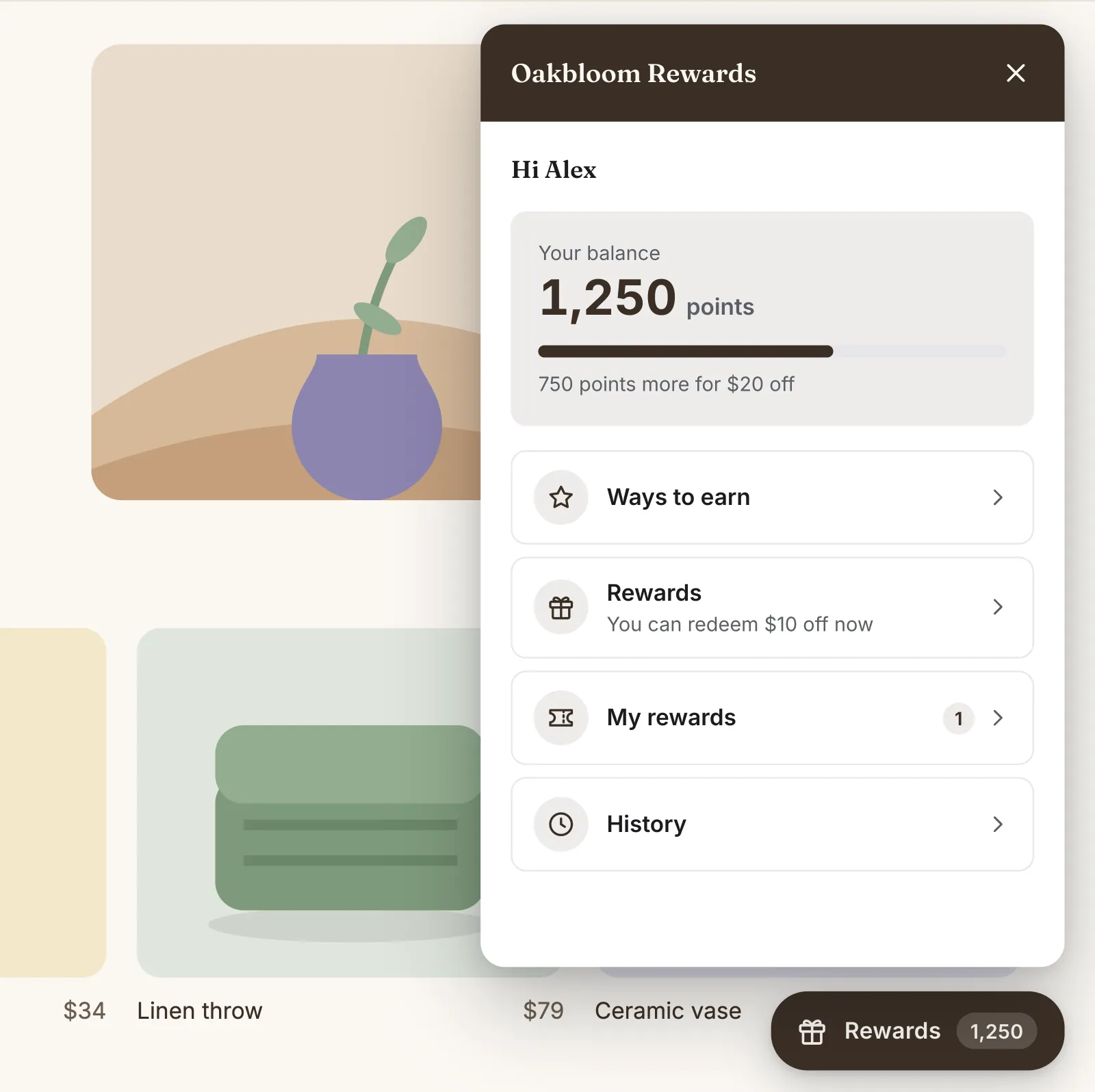
What it does
Points for paid orders
Customers earn points on the order subtotal after discounts, for example 5 points for each $1. A cancellation takes the points back, and a refund takes back its share.
Welcome points and social follows
New members get welcome points once, when they join your loyalty program. Add points for following you on Instagram, TikTok, Facebook, YouTube, Pinterest or X, once for each network.
Up to 12 rewards
Give an amount off, a percentage off or free shipping, each with its price in reward points and an optional minimum order. Each code is for one use, by the customer who got it.
A rewards panel on your store
A Rewards button in a bottom corner opens a panel with the balance, the points to the next reward, the ways to earn and the customer's codes. From the panel, customers apply a code to their cart or copy it.
A rewards program in your colors
The panel takes your store's brand colors, or colors that you pick. Rename the program, the points and the button to match your store.
Members and numbers in your admin
Search members, change a balance with a reason, or cancel a code that was not used. See the sales of orders that earned points, and the codes made and used, for the last 30 days.
Switching from Smile.io, LoyaltyLion, Yotpo, Rivo or Growave? Import your members and their points from a CSV file, and check them first. Export them at any time.
How to start
Turn on Loyalty points
Install Super Useful, then turn on Loyalty points on the app's Dashboard. Turn on the app embed once, in your theme editor: the Dashboard has a link to it.
Set up your program
Your program starts with points for orders, welcome points and four rewards. Change the numbers, add your social pages, and check each change in the live preview.
Customers earn and redeem
Customers click the Rewards button on your store and sign in. They see the points of each order in their history, and redeem them for a code when they have enough.
Questions
Can customers use a reward code with another discount?
Not by default. On the Settings page of Loyalty points, you can let new codes combine with order, product or shipping discounts. You also choose how many days a code stays valid, or let codes never expire.
Do customers need an account to use their points?
Yes, to see and spend them. Their orders earn points before they sign in, and the points wait for them. Shoppers who are not signed in see the ways to earn and the rewards, with a link to sign in.
Can I import my members and points from Smile.io?
Yes. Export your customers from Smile.io as a CSV file, import it on the Import or export page, and check the members and points before you confirm. Files from LoyaltyLion, Yotpo Loyalty, Rivo, Growave and Joy work too.
Do in-store orders earn loyalty points?
Yes, by default, orders from Shopify POS earn points when a customer is on the order. To stop it, turn off Point of sale orders in the editor of Points for orders.
More answers in the questions and answers.
Also in Super Useful
One app and one subscription. Turn on only the tools that you need.
Loyalty points, and 12 more tools
All in one app for your Shopify store.
Coming soon to the Shopify App Store