Bundles
Frequently bought together bundles on product pages
Show frequently bought together bundles under the buy buttons of your product pages. Shoppers add the whole set with one button, and you choose whether the set gets a discount.
Coming soon to the Shopify App Store
See all 13 tools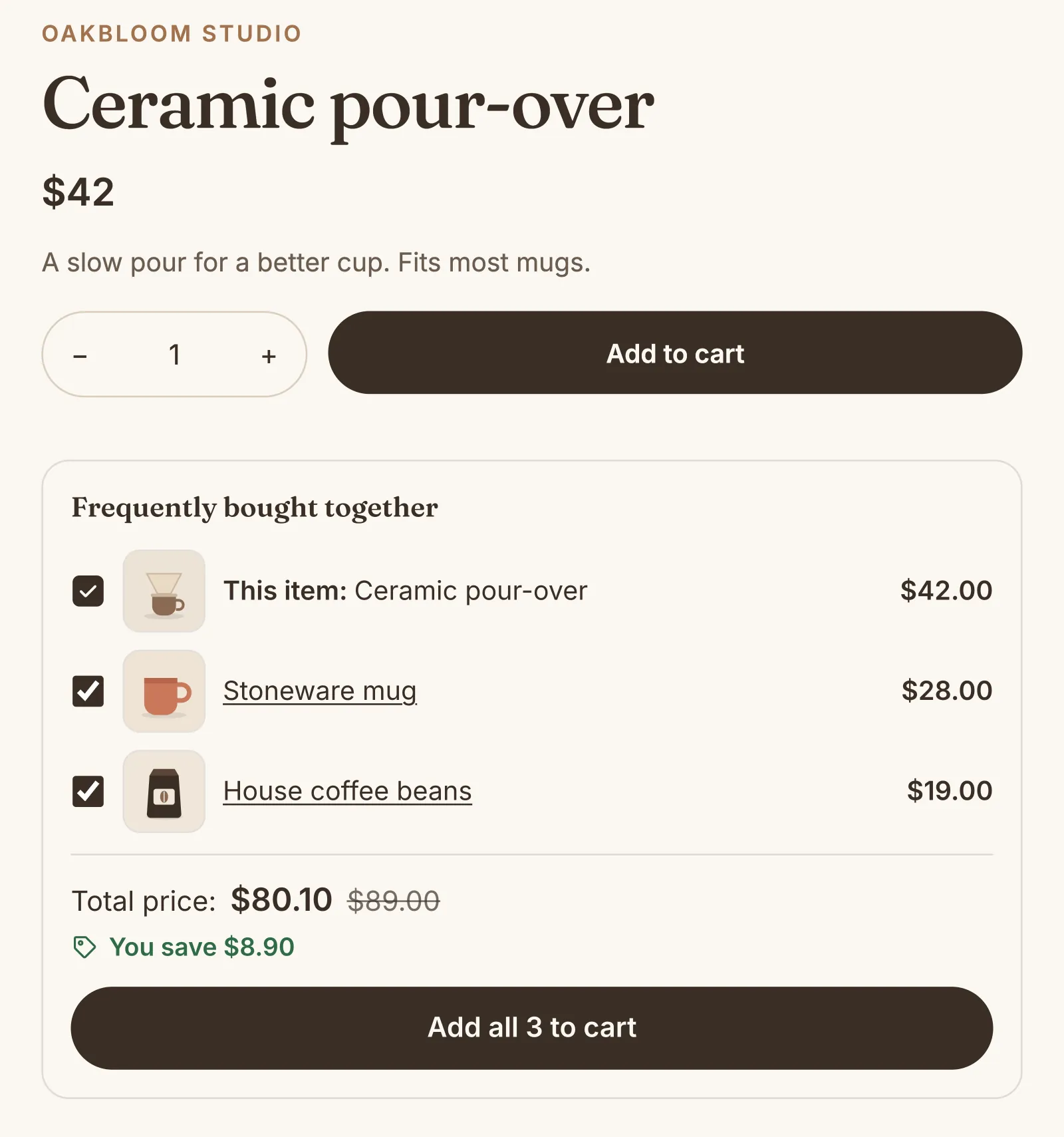
What it does
One button adds the set
Shoppers see each product with its picture and price, the total, and one button: "Add all 3 to cart". They can untick the other products, and choose their size or color.
An optional bundle discount
Give a percentage off each product, an amount off the set, or no discount. Only a complete set gets it, and the cart takes it off by itself.
Three layouts for product bundles
Choose a picture in each row (up to 8 products), a fitted row of pictures (up to 5) or swipe cards (up to 10).
Choose the pages that show it
Show a bundle on the page of each of its products, or only on the main product's page. For example, a phone with its case and charger can show only on the phone's page.
Shopify's picks for other pages
Product pages with no bundle can show up to 2 products that Shopify recommends: related products, or the complementary products that you set in Shopify. This is off until you turn it on, and these products get no discount.
How to start
Turn on Bundles
Install Super Useful, then turn on Bundles on the app's Dashboard. Turn on the app embed once, in your theme editor: the Dashboard has a link to it.
Make your first bundle
Choose 2 products or more and a discount. The editor shows the bundle price and the saving, next to a live preview.
Shoppers add the set
The bundle shows under the buy buttons, with the title "Frequently bought together" or your own. With a discount, the cart takes it off each complete set.
Questions
Do I need to make a new bundle product in Shopify?
No. A bundle is a set of products that you already sell. Each product goes into the cart as its own item, with its own stock.
Does the discount work when shoppers add the products one by one?
Yes. The cart counts the products, not the button. Each complete set in the cart gets the discount: one unit of each product.
Can one product get a bundle discount and a volume discount?
Not on the same unit. Each unit gets one of these discounts at most, and the bundle comes first. The other units of the product can still get a volume discount, and the units of the set count toward its step.
What happens when a product of the bundle sells out?
When every option of a product is sold out, the bundle does not show. When only the chosen option is sold out, the button says "Sold out".
More answers in the questions and answers.
Also in Super Useful
One app and one subscription. Turn on only the tools that you need.
Bundles, and 12 more tools
All in one app for your Shopify store.
Coming soon to the Shopify App Store